One formula, two alkalis
The last post promised the formula workspace. It is close, but testing it against one of our own shaving bars turned up a design that could not hold the formula. This post covers how a formula can now carry more than one alkali, and why that was less work than it sounds.
What we built
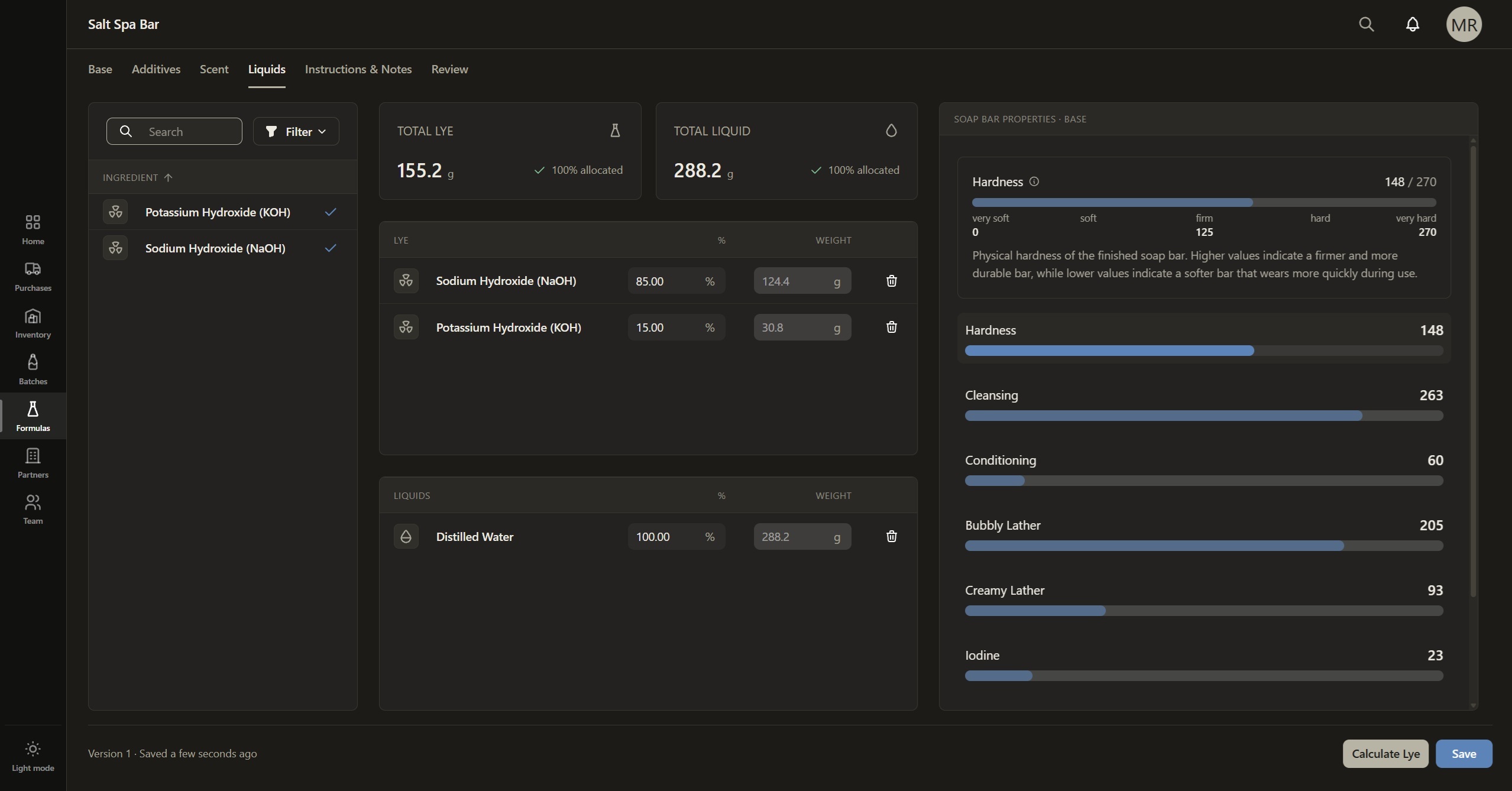
A soap formula in Plan.Make.Trace can now use more than one alkali. NaOH, KOH or both, in whatever proportion the formula calls for, each set as a percentage on the ingredient itself.
The recipe no longer has a lye type at all. Each alkali in the inventory library is linked to the lye type it supplies, so the calculator reads the formula's lye from what is actually in it.
While we were in there, liquids moved to the same approach. Water, aloe vera juice and goat milk are ingredients that each carry a percentage of the required liquid.
The problem it solves
The original soap bar recipe carried a single lye type, chosen once for the whole recipe. KOH was tied to liquid soap, so for a bar recipe it was filtered out of the ingredient picker entirely. That covered every formula we had built the calculator against.
Then we tried to reproduce one of our own shaving bars. Shaving soaps are often made with both alkalis: NaOH for a bar that holds its shape, KOH for a softer, richer lather.
A formula I personally love, and that our own formula builder could not represent! These are dark days indeed. The UI had no way to select or modify two alkalis. In fact, the picker would not even offer the second lye option, because it was filtered out by the recipe type. That is a terrible outcome for a tool whose whole job is holding your formula.
The lye was a property of the recipe. It should have been a property of the ingredients.
The challenge, such as it was
None of this was hard. The saponification calculator was already a pure module with no knowledge of the recipe or the database, and that separation is what made this a small job. Most of the effort went into removing the coupling between the lye and the recipe, not into the calculation.
The NaOH and KOH calculators did not change. What changed is the orchestration around them: work out the full requirement for each alkali from its own saponification values and the superfat, then take each one's share and add them up.
The detail that matters is what the percentage means. A 70% NaOH / 30% KOH formula means NaOH satisfies 70% of the saponification and KOH satisfies the other 30%. It does not mean working out one lye weight and splitting it 70/30.
Those give different numbers, because KOH is a heavier molecule and it takes more of it by weight to saponify the same oil. Take the synthetic blend from our tests, 700 g of olive oil and 300 g of coconut oil, with no superfat because... math....:
- NaOH alone: 151.85 g
- KOH alone: 213.40 g
- 70/30, each alkali's share of its own requirement: 106.30 g NaOH and 64.02 g KOH
- 70/30 as a split of the NaOH weight: 106.30 g NaOH and 45.56 g KOH, leaving the KOH about 18 g light
What makes ours different
The ingredients are authoritative. There is no recipe-level lye setting to fall out of step with what is actually in the formula. NaOH-only, KOH-only and mixed formulas all take the same path, and a single alkali is just one ingredient at 100%.
The maker sets the percentages and the backend owns the weights. Because each alkali's share is calculated against its own saponification requirement, the percentages alone cannot determine the weights. Calculation writes each alkali's weight onto its ingredient, and the screen shows it read-only.
The calculation refuses rather than guesses. If the alkali percentages do not total exactly 100%, or an alkali could mean more than one lye type, the formula is reported as not calculable. Getting lye wrong in either direction matters, and a figure built on a guess is worse than no figure.
Percentages are stored as whole numbers in basis points, where 10000 is 100%. It is the same thinking as the integer milligrams from the saponification post.
Liquids follow the same rule. Each liquid ingredient carries its percentage of the required liquid, those total 100%, and the calculated weights always add up exactly to the requirement, with the rounding remainder assigned rather than lost. A formula with no liquid ingredient still gets its required liquid figure. There is just nothing to split it across.
What this unlocks
We can now represent our shaving bar in Plan.Make.Trace the way it is actually made. The same goes for any formula a soaper builds with both alkalis, whatever the split.
In the formula builder it lives in the new Liquids & Lye stage. Alkalis and liquids sit in two lists, each showing how much of its 100% has been allocated, with the calculated totals in grams above them. The lye type picker is gone from formula setup, because there is nothing left for it to decide.
Real formulas run through the real product expose assumptions that a tidy design can hide. Better that our own shaving bar found this one than a soaper after the beta.
What's next
The completed formula builder. Every stage from oils through additives, scent and Liquids & Lye, and the finished workspace as a soaper will use it.
Liked this post? Tap the heart to let us know.
Get early access
Be the first to hear about early access, roadmap updates, and exclusive early adopter pricing.
Join the early access list